Stop typinginspection reports atmidnight.Stop typing inspection reports at midnight.
Take your photos, talk through what you see, and FieldScribe drafts the report for you to review and export.
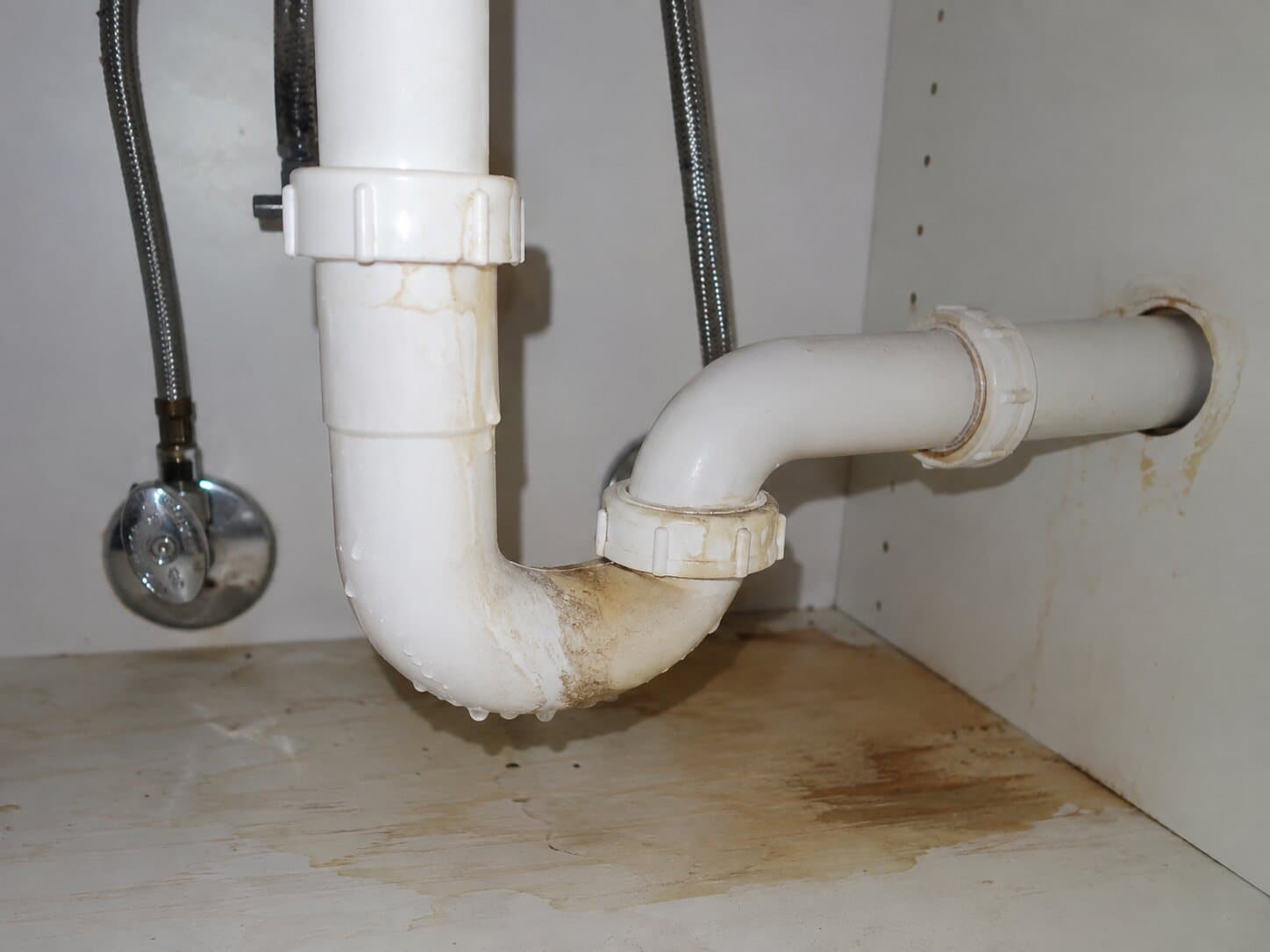 Active drip
Active dripping, with water stains and mineral deposits on the pipe and cabinet floor.
Recommendation Repair by a licensed plumber.
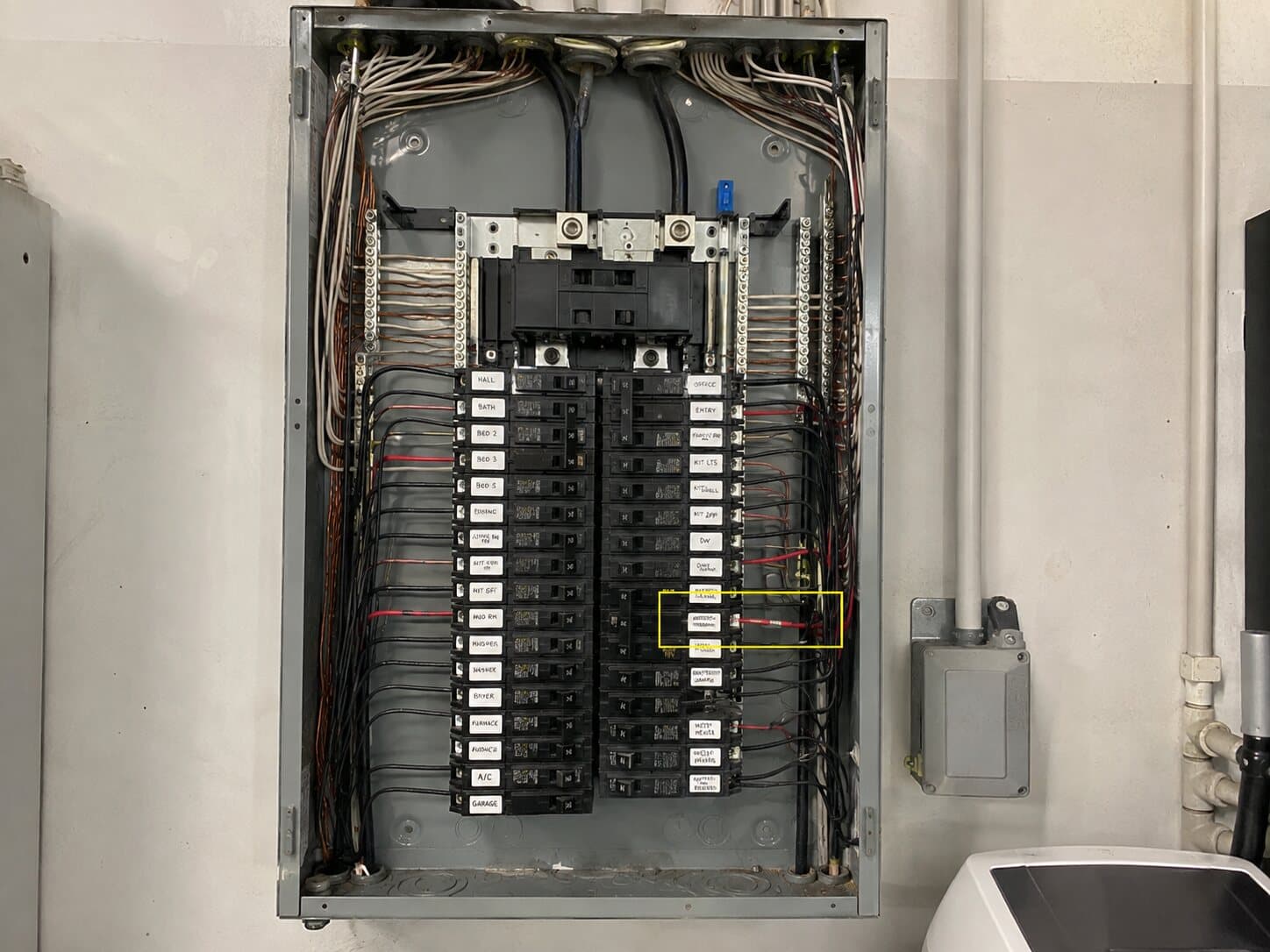 Improper connection
Dead-front cover removed, exposing energized bus bars. One connection appears improper.
Recommendation Evaluation by a licensed electrician.
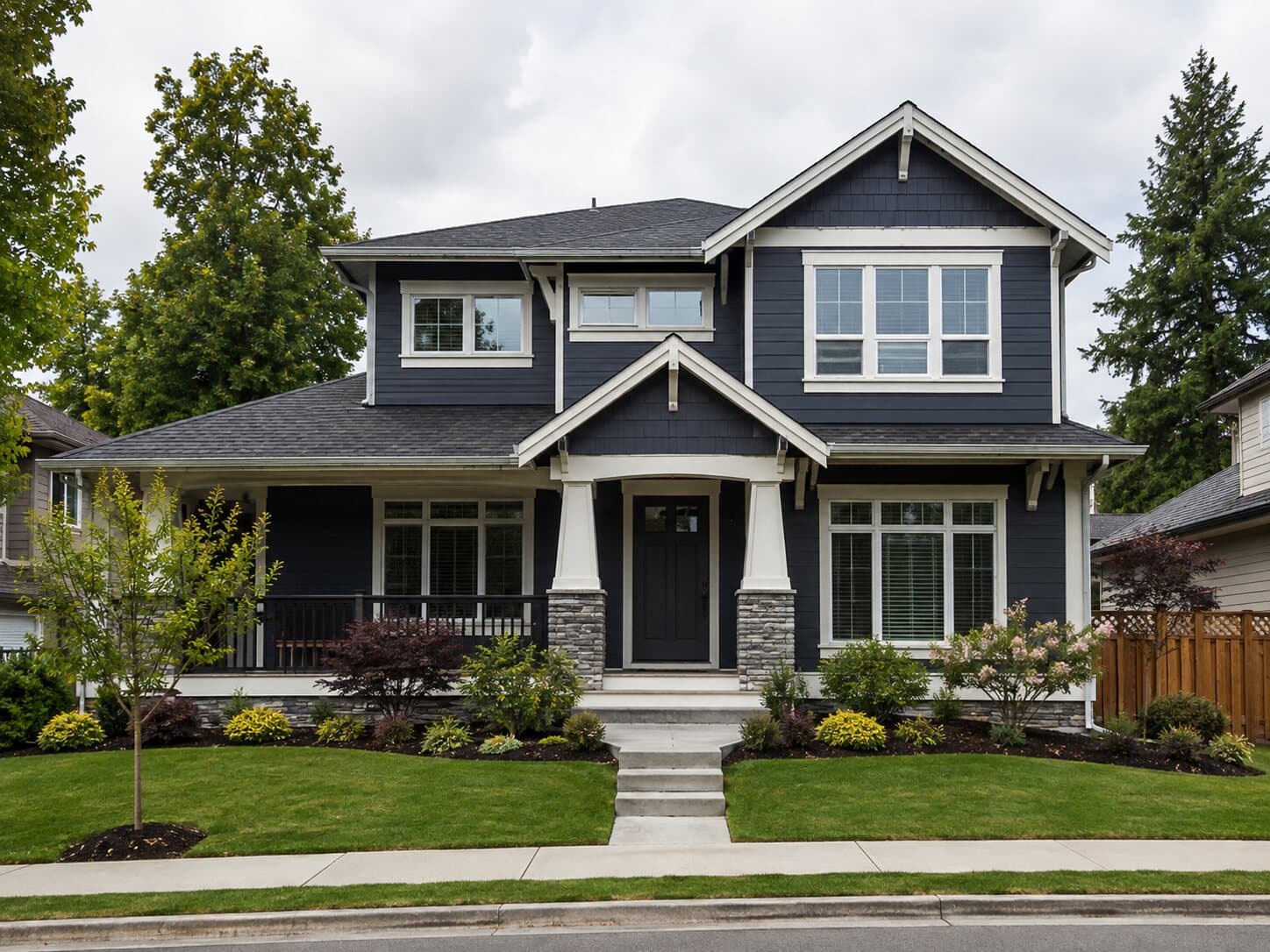
Lap siding with white trim and stone veneer. No visible cracks, rot or water staining.
Recommendation No action identified.
Executive summary
Three photos documented: an active drain leak, an open electrical panel and a sound front elevation.
Priority action items
- Safety5.1 Open panel, exposed bus bars
- Repair6.1 Leaking P-trap under sink
Inspection coverage
- Roof
- Not recorded
- Exterior
- Inspected
- Structure
- Not recorded
- Interior
- Not recorded
- Electrical
- Inspected
- Plumbing
- Inspected
Findings by system
No visible cracks, rot or water staining.
Dead-front cover removed. Evaluation by a licensed electrician.
Active dripping, stained cabinet floor. Repair by a licensed plumber.
Inspector notes & limitations
Recorded limits of the inspection, kept as the inspector wrote them.
Photo evidence
Photo 1Photo 2Photo 3Live — try it right now
Don't take our word for it. Drop a photo.
This is the same AI that writes your reports — live, not a mockup. Upload one photo from any job and watch it write the report entry.
You check the draft. Your client gets the report.
Nothing goes out until you have read it. Here is the review step and the finished PDF, both taken straight from the product.
You review every finding
FieldScribe drafts a finding for each photo. Read it, correct it or rewrite it before it goes in the report. This is the real review card, so press Edit and try it.
Photo 2
PoorP-Trap Assembly — Under Sink Cabinet
The P-trap shows active dripping with water stains, mineral deposits and discoloration on the pipe and cabinet floor, indicating a leak at a slip joint or the trap body. The cabinet floor is stained and damp from ongoing water escape.
Your client gets a report like this
A cover page, the priority items up front, findings by system and numbered photo evidence. These are pages from the sample report, exactly as FieldScribe exports them.


Free · No email required · 11 pages
The sample is fictional and shows the output format. It is not a state-required inspection form.
One inspection. See the difference.
Start with a $9.99 report. Upgrade when you’ve seen what it saves you.
First Report
Run FieldScribe on a real inspection before you commit.
- One complete report credit
- Up to 30 photos
- Voice notes and PDF export
- $9.99 auto-credited if you upgrade
Solo
Best for active inspectors who want lower upfront risk.
- 20 reports per month
- 500 photos per month
- Cancel renewal anytime
- Password or email sign-in
Your logo. Editable Word. No FieldScribe branding.
Add customer branding to any completed report for $2.99 extra. Includes a branded PDF, editable Word export, and support for your own Word template. Pay once for that report; repeat downloads are included.
Returning customer? Sign in
The problem
The inspection ends at 4. The report still owns your night.
FieldScribe turns the photos and notes you already collect into a report draft you can review, edit, export, and send without rebuilding every section by hand.
A section for every system
Roof, exterior, interior and nine more sections guide your notes. Record access limits and see what still needs attention.
Cleaner recommendations
Turn casual field notes into objective draft wording that is easier to review.
Know exactly where FieldScribe fits
It is a focused report-drafting tool, not a replacement for scheduling, agreements, payments, or a full inspection office suite.
Best for
Drafting findings from photos and voice notes
Full-suite platforms
Running the full inspection business workflow
Works with your current setup
Export PDF or copy text into your existing platform
Full-suite platforms
Usually becomes the system of record
Entry Price
$9.99 first report or $29/month Solo
Full-suite platforms
Varies by platform and add-ons
AI Photo Analysis
Included - visible concerns flagged for review
Full-suite platforms
Extra fee or upsell
Voice-to-Report
Voice transcription included
Full-suite platforms
Varies by platform
Report Ownership
PDF and text exports
Full-suite platforms
Export and retention policies vary
Works on Mobile
iOS & Android - no app install
Full-suite platforms
App required, extra steps
| Feature | FieldScribeFocused Tool | Full-suite platforms |
|---|---|---|
| Best for | Drafting findings from photos and voice notes | Scheduling, agreements, payments, and office workflow |
| Works with your current setup | Export PDF or copy text into your existing platform | Usually becomes the system of record |
| Entry price | $9.99 first report or $29/month Solo | Varies by platform and add-ons |
| Voice-to-report | Voice transcription included | Varies by platform |
| Take your report with you | PDF and text exports | Export and retention policies vary |
Core Features
Built for a faster first draft.
We stripped away the bloat. No complex menus, no "CRM" features you don't use. Just capture, speak, review, and export.
AI Vision Analysis
Upload up to 30 site photos. FieldScribe analyzes visible conditions, flags potential concerns, and drafts the captions for your review.
Voice-to-Report
Walk the site and talk. We transcribe your stream-of-consciousness into structured, professional observations.
Professional Wording
Turn casual notes into objective observations and clear recommendations — then review every line using your professional judgment.
The honest pitch
We're new. Judge us by the output, not by reviews.
FieldScribe launched recently, so we won't show you a wall of five-star quotes. Instead, here are three ways to verify the product yourself before spending more than the cost of lunch.
Read a real report first
Review the sample output and its limitations before you buy. Every generated report remains a draft for the inspector to verify.
Test it on one real job
Your first report is $9.99 with no subscription. Run your next inspection through it and decide with your own evidence.
Low commitment by design
Reports can be recovered from your browser and account. Raw photos are processed by AI providers and are not saved in the report database. Monthly plans cancel through Stripe.
Your reports stay yoursFrequently Asked Questions
Does the inspection have roof, exterior, interior and other sections?
How is FieldScribe different from writing a report in ChatGPT?
What happens immediately after I pay?
What is included in the $9.99 First Report?
What does the $29/month Solo plan include?
Can I remove FieldScribe branding and add my own logo?
Can I use our own Microsoft Word template?
Are photographs placed automatically in Word?
Will my work survive closing the tab?
Can I send the AI draft without reviewing it?
See all answers about inspection sections, pricing, templates, and saved work →
Inspector Resources
Guides written for working inspectors — no fluff.
Spectora Pricing 2026: Plans, Monthly Cost, and Alternatives
A full breakdown of Spectora's current pricing, trial, add-ons, and lower-risk alternatives for solo inspectors.
Read articleHow to Write Home Inspection Reports Faster
Practical ways to reduce repeat typing, organize field notes, and shorten the after-hours reporting workflow.
Read articleBest Home Inspection Software in 2026: A Practical Comparison
Spectora, HomeGauge, ISN, and FieldScribe compared across price, AI features, mobile support, and report quality.
Read articleBest Spectora Alternatives for Solo Inspectors
Compare lower-risk report-writing workflows before committing to a full monthly inspection platform.
Read articleInspection Checklists by Type
Detailed checklists for 4-point, wind mitigation, sewer scope, radon, mold, septic, roof, electrical, plumbing, HVAC, pre-listing, and new construction inspections — what to look at, what the common findings mean, and how to document them.
Browse checklists Free toolsFee & report-time calculators
Price an inspection by size, age, and add-ons — and see what report writing really costs you per year.
Open the calculatorsPlans from $9.99
One report · No subscription